The budget spreadsheet built around your paycheck, not the calendar.
- Google Sheets + Excel
- No bank login
- 7-day money-back guarantee
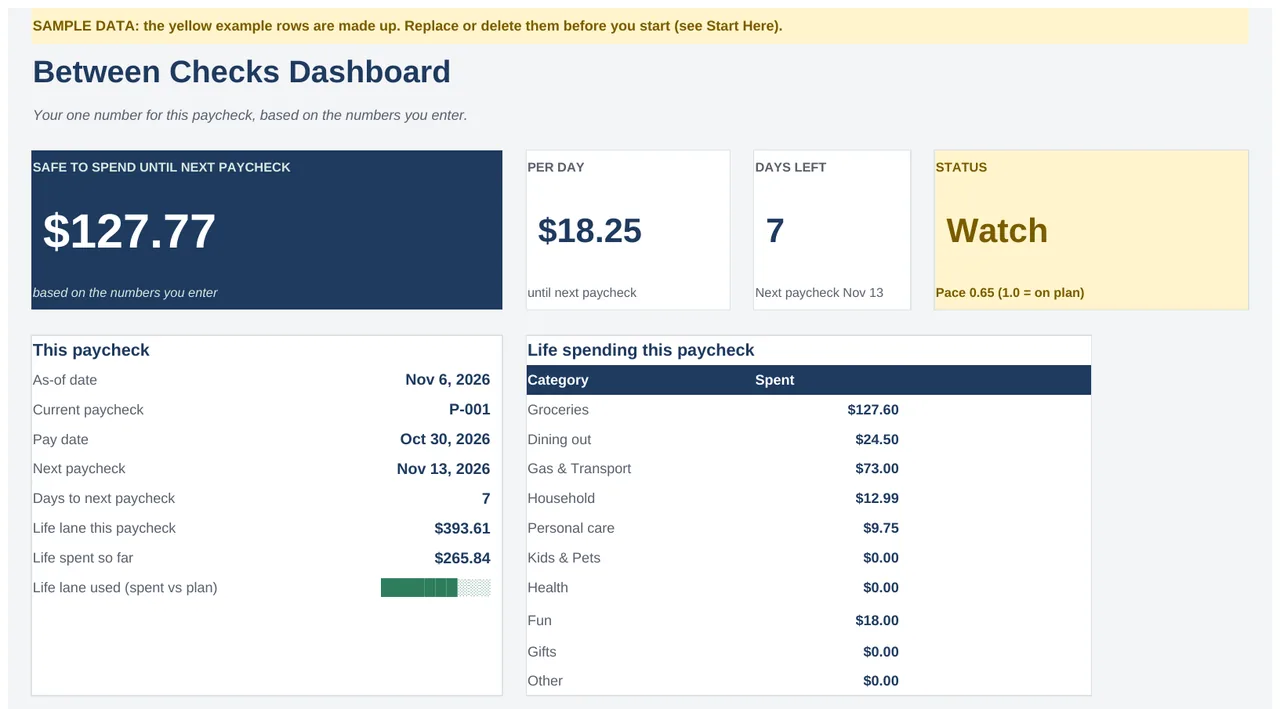
Between Checks lines up every bill with the paycheck that covers it and shows one number: what's safe to spend until your next payday, based on the numbers you enter.
Instant access by email after checkout. Nothing ships.
Your bills are monthly. Your paycheck isn't.
Rent is due on the 1st, the car on the 15th, and pay lands every other Friday. A monthly budget can't tell you which paycheck has to cover which bill, so "can I spend this?" stays a guess. Between Checks plans one paycheck at a time:
- 1Every bill on the paycheck that covers it, so you see what's spoken for before payday.
- 2Each paycheck split into 3 lanes: Bills, Goals and Life, with a split you can edit.
- 3One safe-to-spend number until your next paycheck, plus a per-day amount.
- 4A 5-step weekly check-in that keeps the number current.
The real tabs, with sample data
Every screen below is the actual planner. The yellow rows are example data you clear before adding your own.
Each bill lands on the paycheck before its due date.
Enter the bill and its due day once. The planner finds the next due date and the paycheck that covers it.

Every paycheck, split into Bills, Goals and Life.
The Life lane is what's left for groceries, gas and everything else, and it's where your number comes from.

Log a purchase. The number updates.
Pick a category and the lane and paycheck fill in on their own. Quick entries also work in the free Google Sheets app on your phone.

Five steps, once a week.
Log, check bills, adjust one goal, read your number, write one note. Your streak shows the habit building.

One file, two versions, ready to use
- Between Checks Planner for Google Sheets. One click makes your own copy in your Google Drive. Any free Google account works.
- The same planner for Excel (.xlsx). Same tabs, same formulas. Excel 2016 or later, including Microsoft 365.
- Sample data and a clear-it guide, so you can see how everything works before you enter your own numbers.
- Free updates to version 1.
How access works
Right after checkout you get access by email, with a "Make a copy" link for Google Sheets and the Excel download. Nothing ships. No macros, add-ons or bank connection.
Between Checks Planner
Secure checkout by Hotmart · 7-day money-back guarantee
An honest comparison
| Between Checks | Monthly budget template | Bank-sync budgeting app | |
|---|---|---|---|
| Plans around | Each paycheck | The calendar month | Usually the month |
| Safe-to-spend until payday | One number, plus per day | Not usually | Some apps |
| Bank login | Not needed | Not needed | Required |
| Imports transactions | No, you enter them | No | Yes, automatically |
| Cost | $17 once | Free to one-time | Usually a subscription |
What it doesn't do: it doesn't connect to your bank or import anything. If you want transactions pulled in for you, an app is the better fit. If you want paydays and bills lined up in a sheet you own, this is it. It's an organizational tool, not financial advice.
7-Day Money-Back Guarantee
7-Day Money-Back Guarantee. If you're not happy with your purchase for any reason, request a refund within 7 days by replying to your purchase email or directly at refund.hotmart.com with your order number. Full terms: https://betweenchecks.com/refund
FAQ
Does it work in Excel?
Yes. You get an .xlsx with the same tabs and formulas as the Google Sheets version. It works in Excel 2016 or later, including Microsoft 365.
Can I use it on my phone?
Partly. With the free Google Sheets app you can view your number and log quick entries. Setup and the weekly check-in are done on a computer.
Does it connect to my bank?
No. You enter your paychecks, bills and spending, and the planner does the math. Nothing is linked to your bank, and we never see your numbers.
I'm paid weekly, biweekly, twice a month or monthly. Does it work?
Yes. Pick your schedule in the Start Here tab and the plan follows your real paychecks. If your pay changes, enter the actual amount when it arrives.
What if it's not for me?
You're covered by the 7-day money-back guarantee above. Request a refund within 7 days by replying to your purchase email or at refund.hotmart.com.
Do I get updates?
Yes. Every version 1 update is included at no extra cost.
Who's behind it?
Between Checks is made by BRFY Tecnologias. Questions before or after you buy: support@betweenchecks.com.
Know what's safe to spend before your next payday.
Bills lined up with your paychecks, one number to check, and a short weekly routine to keep it honest.
Get Between Checks for $17 →One-time payment · Google Sheets + Excel · 7-day money-back guarantee